Lupus Consulting

SAP EWM RF Framework: Optimizing Mobile Data Entry in the Warehouse

The SAP EWM RF Framework is a core capability of SAP Extended Warehouse Management (EWM) that enables real-time data capture on mobile devices used in warehouse operations. It provides a configurable platform for executing tasks such as picking, putaway, inventory, and session management on handhelds and rugged scanners, while separating presentation from business logic for flexible customization.

Quick Answer

  • The RF (Radio Frequency) Framework in SAP EWM enables mobile warehouse processes by rendering RF screens for handheld devices (typically via SAP ITSmobile) and communicating with the ERP backend over Wi‑Fi. It supports common warehouse transactions (logon/logoff, recovery, putaway, picking, inventory) and is highly configurable without changing core SAP code. Modern S/4HANA environments may use SAP Fiori apps as an alternative UI for tablets and smartphones, while RF remains common for rugged, keyboarded barcode scanners.
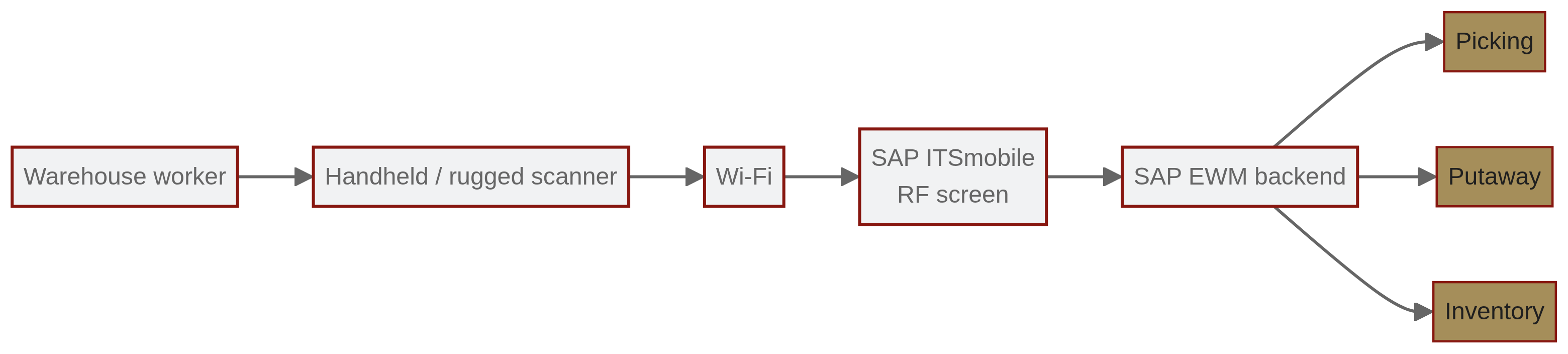
architecture of sap ewm rf framework

What is the RF Framework?

  • RF = Radio Frequency Framework.
  • SAP EWM = SAP Extended Warehouse Management.
  • The RF Framework is the mobile execution layer for EWM that enables warehouse workers to perform tasks on handheld devices. It translates SAP transactions into mobile-friendly screens and manages the flow of steps required for each warehouse process.

How it works and architecture

  • Communication: RF devices typically communicate with the backend over Wi‑Fi.
  • Presentation: SAP ITSmobile is used to render RF screens as HTML pages for mobile browsers on handheld devices.
  • Navigation: Supports both menu-driven navigation and direct transaction navigation.
  • Separation of concerns: Business logic is separated from the presentation layer, allowing screen layouts and flows to be customized without changing business code.
  • Customization: Screen layouts, logical transactions, step flows, and field settings can be adjusted; consultants can add custom fields or verification profiles without modifying core SAP code.

Typical transaction types and key customizing elements

Common transaction types:

  • Logon / logoff
  • Session recovery
  • Putaway (goods receipt → storage)
  • Picking (outbound processes)
  • Inventory adjustments and cycle counts

Key customizing elements:

  • Definition of logical transactions
  • Step flow configurations (sequence of steps within a transaction)
  • Screen layouts and field attributes
  • Verification profiles and input validations

Fiori alternatives and modern UIs

  • S/4HANA environments increasingly use SAP Fiori for Warehouse Management.
  • SAP Fiori apps provide a modern, responsive user experience suited to tablets and smartphones.
  • The traditional RF Framework remains widely used for ruggedized, keyboard-based barcode scanners and cases where lightweight HTML rendering via ITSmobile is preferred.

Common pitfalls and practical recommendations

Common pitfalls:

  • Inadequate hardware (poor Wi‑Fi antennas, small screens, unsuitable scanners) causing performance and usability issues.
  • Insufficient user training leading to low adoption and operational errors.
  • Instability or poor design of the network infrastructure resulting in dropped sessions and lost or duplicated data.

Recommendations:

  • Select hardware that matches the use case (rugged scanners vs. tablets).
  • Validate Wi‑Fi coverage and capacity for peak loads.
  • Provide role-based training and simple screen flows to improve adoption.
  • Use the RF Framework’s customization options to minimize unnecessary steps and data entry.

FAQ

English

  • Q: What are the core benefits of using the SAP EWM RF Framework?
    • A: Real-time inventory updates, reduced paper usage, faster transactions, and lower error rates for picking and putaway.
  • Q: How does the RF Framework integrate with mobile devices?
    • A: It commonly uses SAP ITSmobile to translate SAP GUI/RF screens into HTML for mobile browsers on handheld devices; devices communicate over Wi‑Fi with the backend.
  • Q: Are there modern alternatives to the traditional RF Framework?
    • A: Yes. SAP Fiori apps offer a modern UI and responsiveness for tablets and smartphones, though RF remains standard for rugged scanners and keyboard-led workflows.

Related Articles