Lupus Consulting

How to Migrate from SAP WM to SAP EWM: Best Practices and Pitfalls

Migrating from SAP WM (Warehouse Management) to SAP EWM (Extended Warehouse Management) moves warehouse processes from a legacy WM module toward a modern, feature-rich EWM platform. This migration aligns with SAP’s strategic focus on S/4HANA and EWM, supports complex automation, and improves operational efficiency — but it requires careful planning across data, processes, integrations, and change management.

Quick Answer

A successful migration typically follows a greenfield (new implementation) or phased rollout approach, uses tools like the SAP Migration Cockpit for master data, and requires explicit planning for data model differences (for example, introducing Handling Units), integrations, testing, and user training. Expect projects to take roughly 6–18 months depending on complexity and number of warehouses.
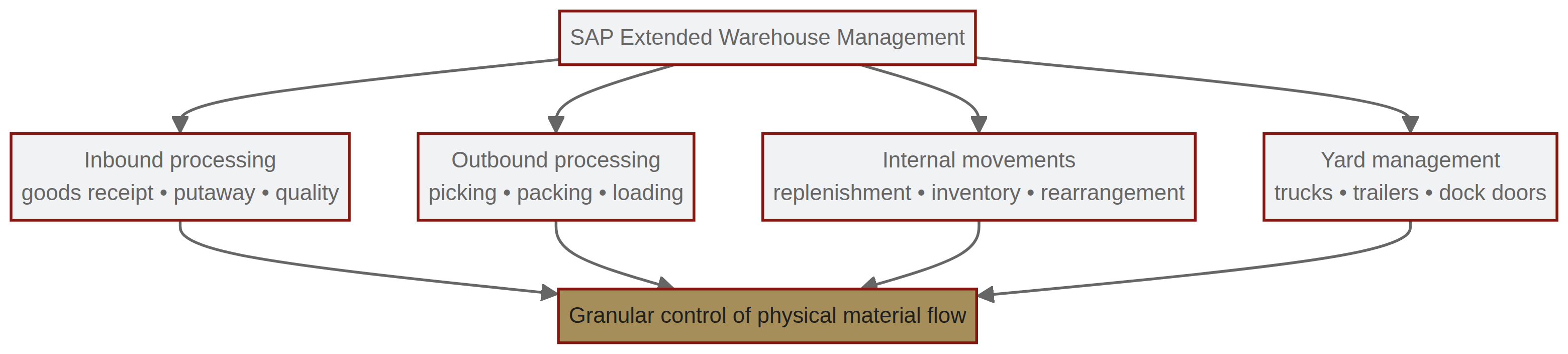
overview of capabilities of sap ewm

Why migrate from SAP WM to SAP EWM?

  • SAP WM is a legacy component of SAP ERP ECC and has had no functional development since 2005.
  • Mainstream maintenance for SAP Business Suite 7 ends on December 31, 2027. SAP WM running in compatibility mode within SAP S/4HANA is supported only until December 31, 2025 [1].
  • SAP EWM is the strategic replacement for modern supply chains and is the recommended future-proof solution.

Key terms (first use)

  • SAP WM — SAP Warehouse Management (legacy module in ECC)
  • SAP EWM — SAP Extended Warehouse Management
  • HU — Handling Unit
  • ECC — SAP ERP Central Component
  • S/4HANA — SAP’s next-generation business suite

Migration approaches

  • Greenfield (New implementation)
    • Build EWM from scratch.
    • Best when you want to redesign processes and remove legacy customizations.
  • Brownfield (System conversion)
    • Upgrade existing systems.
    • Less common from WM to EWM because of architectural differences between the modules.
  • Phased Rollout
    • Migrate warehouse by warehouse to reduce business disruption and allow staged testing and stabilization.

Data migration: main challenges

  • Master data vs transactional data
    • Master data (products, storage bins) is typically migrated using migration tools such as the SAP Migration Cockpit.
    • Transactional data (open transfer orders) is generally not transferred; operations often complete or close remaining transactions before cutover.
  • Data model mapping
    • WM has a simpler data model; EWM is more complex and may require introducing Handling Units (HU), warehouse process types, and more granular bin/slot definitions.
  • Custom developments
    • Legacy custom code in WM often needs rework or redesign to align with EWM’s architecture.
  • Integrity and consistency
    • Incorrect mapping or overlooked dependencies can lead to inventory discrepancies and process failures.

Common pitfalls and how to avoid them

  • Underestimating complexity of data migration
    • Do a detailed inventory of master and custom data; prototype mappings early.
  • Inadequate integration testing
    • Test all interfaces (ERP, TMS, automation systems, RF/mobile devices) in a sandbox or test environment.
  • Poor change management and training
    • Invest in user training and process documentation; plan go-live support.
  • Not planning for cutover downtime
    • Define cutover windows, reconcile inventories, and prepare rollback/contingency steps.
  • Ignoring automation and hardware impacts
    • If you use material flow systems (MFS), conveyors, robots, or RF hardware, test EWM integrations beforehand.

Practical planning checklist

  • Decide approach: greenfield vs phased rollout (brownfield usually not recommended).
  • Inventory master data, custom code, and open transactions.
  • Define EWM process design (HUs, warehouse process types, storage control).
  • Prepare data migration scripts/configurations and validate with pilots.
  • Establish integration and end-to-end test plans (including sandbox testing).
  • Plan cutover date, downtime, reconciliation steps, and contingency.
  • Execute user training, go-live support, and post-go-live stabilization.

Tools commonly used

  • SAP Migration Cockpit (for master data migration)
  • Sandbox/test environments for integration and user acceptance testing
  • Standard SAP and partner tools for reconciling inventory and validating transactions

FAQ

Q: Why is SAP WM being discontinued?
A: SAP has focused innovation and development on S/4HANA and EWM; WM is a legacy solution with no recent functional development.

Q: How long does an SAP WM to EWM migration typically take?
A: Depending on complexity and number of warehouses, a migration can take roughly 6 to 18 months.

Q: Are transactional records (open transfer orders) migrated to EWM?
A: Generally not. Organizations commonly complete or close open transactions before cutover and migrate master data instead.

Q: What are the biggest data migration challenges?
A: Mapping legacy custom code and transitioning from non–Handling Unit (HU) managed stock in WM to EWM’s stricter HU management model.

Q: Which migration approach is recommended?
A: Greenfield or phased rollouts are most common. Brownfield conversions from WM to EWM are less common due to architectural differences.

Related Articles