Salesforce and SAP Integration: A Practical Guide

Integrating Salesforce and SAP is a critical step for any organization looking to create a seamless, end-to-end business process, from lead generation to revenue recognition. A successful integration provides a unified view of customer and operational data, empowering sales teams with real-time insights and streamlining back-office processes. This guide offers a practical approach to integrating Salesforce and SAP, covering key benefits, challenges, and best practices to ensure a successful project.

Why Integrate Salesforce and SAP?

Salesforce is the market-leading CRM, excelling at managing customer relationships, sales pipelines, and marketing campaigns. SAP is the backbone of many enterprises, handling finance, logistics, and supply chain management. Integrating these two powerhouses unlocks significant business value:

  • 360-Degree Customer View: Sales teams in Salesforce can access real-time information from SAP, such as order history, credit status, and inventory levels, enabling more informed and effective customer interactions.
  • Streamlined Quote-to-Cash Process: Automate the creation of sales orders in SAP from closed-won opportunities in Salesforce, reducing manual data entry, minimizing errors, and accelerating revenue recognition.
  • Improved Data Accuracy: A single source of truth for customer and product data eliminates inconsistencies between your front-office and back-office systems, leading to better decision-making across the organization.
  • Enhanced Business Intelligence: Combining sales data from Salesforce with financial and operational data from SAP provides a holistic view of business performance, enabling more accurate forecasting and strategic planning.

Key Integration Patterns and Use Cases

When integrating Salesforce and SAP, it's important to identify the key data flows and business processes you want to connect. Common integration patterns include:
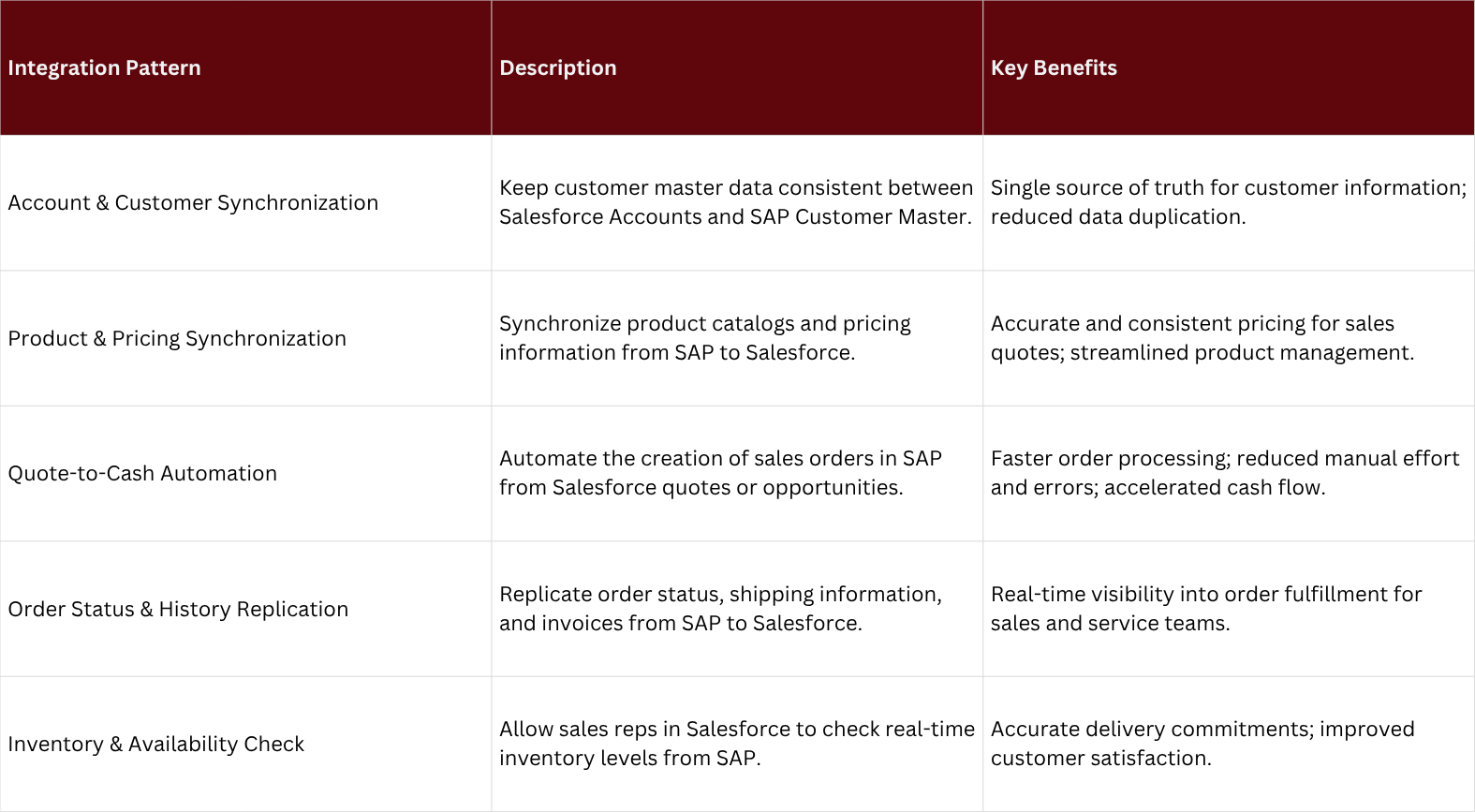
Benefits of integrating SF and SAP

Choosing the Right Integration Approach

There are three primary approaches to integrating Salesforce and SAP, each with its own advantages and disadvantages:

  1. Point-to-Point Integration: This involves creating custom connections between Salesforce and SAP using APIs. While this approach can be tailored to specific needs, it can become complex and difficult to maintain as the number of integrations grows.
  2. Middleware (iPaaS): An Integration Platform as a Service (iPaaS) provides a centralized platform for building, deploying, and managing integrations. iPaaS solutions offer pre-built connectors for Salesforce and SAP, simplifying the integration process and providing a scalable and manageable solution.
  3. Custom Development: For highly complex or unique integration scenarios, custom development may be necessary. This approach offers the most flexibility but also requires significant development resources and expertise.
    For most organizations, an iPaaS solution is the recommended approach, as it strikes the right balance between flexibility, scalability, and ease of use.

Best Practices for a Successful Integration

  • Define a Clear Integration Strategy: Before you begin, clearly define your integration goals, identify the key business processes to be integrated, and create a detailed data mapping document.
  • Start Small and Iterate: Don't try to integrate everything at once. Start with a few key processes, such as account and product synchronization, and then gradually add more complex integrations as you go.
  • Focus on Data Quality: Ensure that your data in both Salesforce and SAP is clean and consistent before you begin the integration. This will prevent data-related issues down the line.
  • Involve Business Stakeholders: Work closely with your sales, finance, and operations teams to ensure that the integration meets their needs and that they are trained on the new processes.
  • Monitor and Maintain: Once the integration is live, continuously monitor its performance and be prepared to make adjustments as your business processes evolve.

Conclusion

Integrating Salesforce and SAP is a transformative initiative that can deliver significant business value. By providing a unified view of your customer and operational data, you can empower your teams to work more efficiently, make smarter decisions, and deliver a superior customer experience. By following the practical guidance and best practices outlined in this guide, you can ensure a successful integration that drives growth and profitability for your organization.

More about related topics

Salesforce Agentforce how to build one

How to Build Your First Salesforce Agent: A Step-by-Step Tutorial

Build your first Salesforce Agent with this step-by-step tutorial. Learn how to use Age

checklist next to computer

The Ultimate SAP Custom Code Adaptation Checklist for Your S/4HANA Migration

The ultimate phase-by-phase checklist for SAP custom code adaptation during S/4HANA mig