What is Atlassian Guard? A Complete Guide to Securing Your Cloud Instance

Data security has never been more imperative. As more teams rely on Atlassian's powerful cloud products like Jira and Confluence to drive innovation, the need for centralized, enterprise-grade security has never been greater. This is where Atlassian Guard comes in.

So, what exactly is Atlassian Guard? Atlassian Guard is a cloud security subscription that provides a centralized suite of advanced security capabilities, including data loss prevention, threat detection, and identity and access management, across all your Atlassian cloud products. It empowers security teams to proactively protect sensitive data, detect suspicious activity, and respond to threats before they escalate into major incidents.

This guide will provide a comprehensive overview of Atlassian Guard, its key features, and how it helps organizations establish a robust security posture in the Atlassian cloud.

Why Enterprise Security in Atlassian Cloud Matters

The shift to cloud-based collaboration tools has brought immense benefits in terms of agility and accessibility. However, it also introduces new security challenges. With data distributed across multiple products and users accessing information from various locations and devices, maintaining control and visibility can be difficult. According to Atlassian, a staggering 75% of their enterprise cloud customers now use Guard, highlighting the critical need for a unified security solution.

Without a centralized security layer, organizations face increased risks, including:

  • Data Loss: Unauthorized sharing or exporting of sensitive information.
  • Security Breaches: Weak authentication or compromised credentials leading to unauthorized access.
  • Shadow IT: Unsanctioned use of cloud products, creating security blind spots.
  • Compliance Violations: Failure to meet regulatory requirements like GDPR or SOC 2.

Atlassian Guard is designed to address these challenges head-on, providing a single control plane to manage security across your entire Atlassian ecosystem.

The 3 Pillars of Atlassian Guard

Atlassian Guard's capabilities are built around three core pillars, designed to provide comprehensive protection throughout the security lifecycle.

1. Proactively Protect Against Data Loss

The first pillar focuses on preventing security incidents before they happen. Guard allows you to establish and enforce security policies that safeguard your data and control access.

Key features include:

  • Advanced Authentication Policies: Go beyond basic login requirements by setting multiple, granular policies for both managed and external users. This can include enforcing two-step verification, setting session durations, and restricting access from specific IP addresses.
  • Single Sign-On (SSO): Enforce SSO across all your Atlassian products through integration with major identity providers like Okta, Azure AD, and Google Workspace. This streamlines user access and strengthens security by centralizing authentication.
  • Mobile App Management (MAM): Secure your team's work on the go by enforcing security controls on mobile devices, such as requiring biometric authentication or blocking screen captures.
  • Data Classification (Premium): A premium feature that allows you to classify sensitive data within Confluence and Jira. This enables you to create targeted security policies, such as blocking public sharing of pages labeled "Confidential," significantly reducing the risk of accidental data leaks.

2. Detect Suspicious Activity and Data Misuse

The second pillar is about gaining visibility into user activity and identifying potential threats in real-time. Guard provides the tools to monitor your environment and uncover anomalous behavior.

Key features include:

  • Centralized Audit Logs: Examine user and administrative activity across all your Atlassian products from a single, unified log. This allows you to track events like page exports, permission changes, and user logins to identify suspicious patterns.
  • Automatic Product Discovery: Reduce the risk of shadow IT by automatically discovering any unsanctioned Atlassian product instances created with your company's domain. This gives you a complete picture of your organization's Atlassian footprint.
  • Customizable Detection Rules (Premium): With Guard Premium, you can create custom rules to detect specific high-risk activities. For example, you can set up an alert for when a user downloads an unusual number of attachments or logs in from a suspicious location.

3. Respond Before Threats Become Incidents

The final pillar focuses on enabling rapid and effective incident response. When a potential threat is detected, Guard provides the context and tools to take immediate action.

Key features include:

  • Centralized Alerts (Premium): Gain a unified view of all security-related events and alerts in one place. This helps security teams prioritize their efforts and focus on the most critical threats.
  • SIEM Integrations (Premium): Accelerate incident response by integrating Guard with your existing Security Information and Event Management (SIEM) system, such as Splunk or Datadog. This allows you to correlate Atlassian cloud data with other security signals for a more holistic view.
  • Suggested Remediations (Premium): When a threat is detected, Guard Premium provides actionable remediation suggestions, such as suspending a user's account or revoking access tokens, allowing security teams to neutralize threats efficiently.

Atlassian Guard Standard vs. Premium

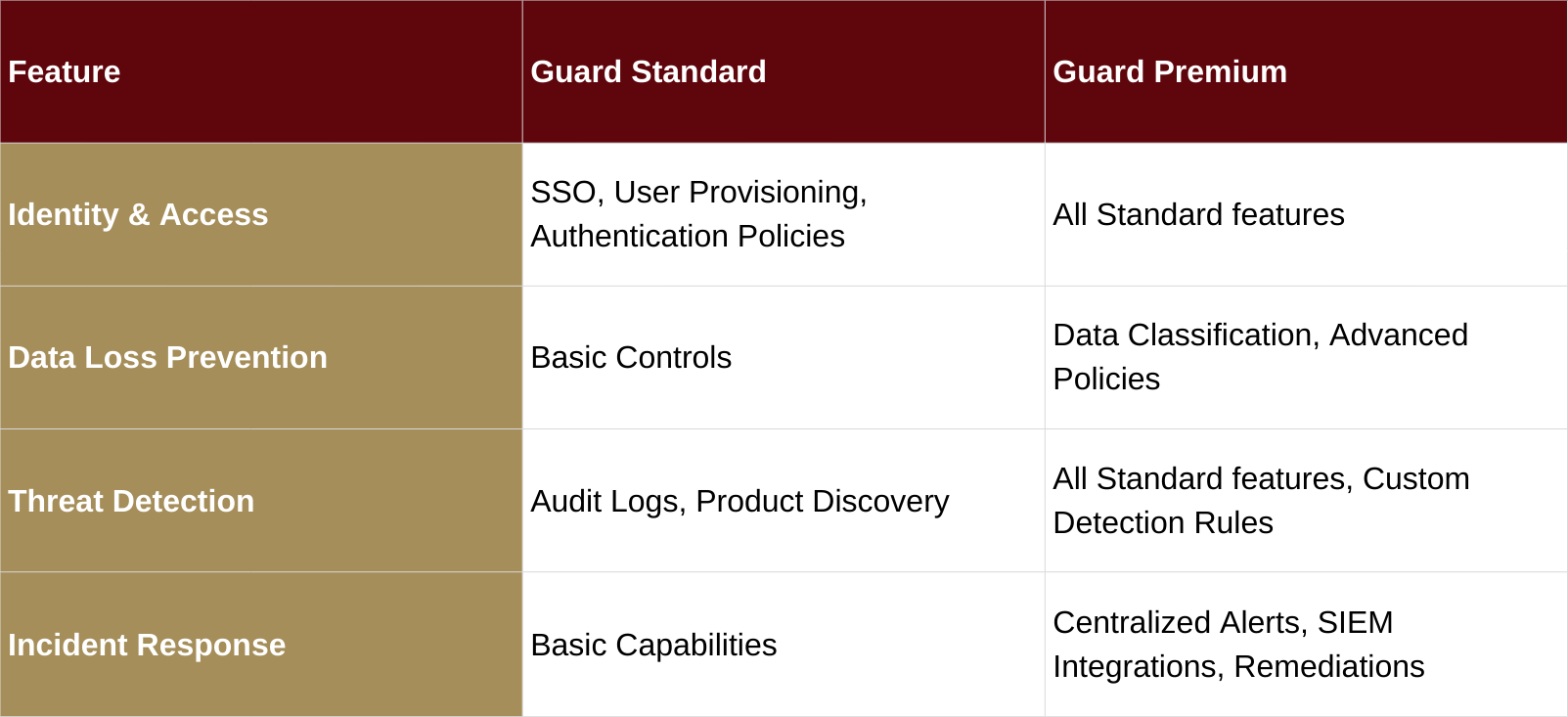
Atlassian Guard is available in two tiers, allowing you to choose the level of security that best fits your organization's needs.
What is Atlassian Guard? A Complete Guide to Securing Your Cloud Instance

Guard Standard provides a strong foundation for enterprise security, covering essential identity and access management capabilities. It is ideal for organizations looking to centralize user management and enforce consistent authentication policies.

Guard Premium offers the most advanced security features, including data classification, customizable threat detection, and streamlined incident response. It is designed for organizations with stringent security and compliance requirements that need to protect mission-critical data.

Conclusion: A Strategic Imperative for Cloud Security

In an era of distributed teams and cloud-first strategies, securing your collaborative work environment is non-negotiable. Atlassian Guard provides a powerful, centralized solution to protect your valuable data, detect emerging threats, and respond with speed and precision.

By implementing Atlassian Guard, organizations can move from a reactive to a proactive security posture, enabling them to:

  • Strengthen Data Protection: Prevent data loss with granular access controls and data classification.
  • Enhance Threat Visibility: Gain a unified view of user activity and detect suspicious behavior.
  • Accelerate Incident Response: Quickly identify and neutralize threats before they cause significant damage.
  • Ensure Compliance: Meet regulatory requirements with robust audit logs and security controls.

Whether you are just starting your cloud journey or are looking to enhance your existing security framework, Atlassian Guard offers the tools and capabilities to safeguard your next breakthrough.
More Hot Topics

cloud security icons

Atlassian and BaFin Compliance: Getting Cloud Security Right in the Financial Sector

Atlassian’s EU Financial Services Addendum helps banks and insurers meet BaFin and EBA

Empowering Non-Technical Teams with Jira Work Management

Atlassian Tools for Non-Technical Teams: Jira Work Management

Think Jira is just for developers? Think again. From marketing to HR and finance—discov