SAP
AMS
Atlassian
Products
Industries & Expertise
BEST-SHORING
Knowledge Base
SALESFORCE


In the dynamic world of Project, Program, Delivery, and Release Management, a singular question consistently dominates discussions: "When?" While status updates and progress insights offer value, the core of every conversation inevitably returns to critical timelines:
When will the new features be available in the test environment?
When will they be ready for integration and User Acceptance Testing (UAT)?
When will they reach production, with feature flags enabled?
When can we expect to see tangible outcomes and business value?
Answering this seemingly simple question is often complex. This comprehensive guide, outlines practical, actionable techniques within Atlassian Jira to create and effectively share release calendars. By incorporating intermediate milestones, these calendars significantly improve transparency, manage stakeholder expectations, and ensure everyone remains informed and aligned.
Effective expectation management is a cornerstone of successful project delivery. Release calendars serve as a powerful tool in this regard, offering clarity and predictability in complex development cycles.
While various frameworks evolve, fundamental principles endure. A core tenet of the Agile Manifesto emphasizes measuring progress through working software. This mindset is crucial for any high-performing engineering organization.
Progress tracked via Epics, Initiatives, and Capabilities is undoubtedly important for planning and organization. However, true business value is realized when software is successfully released into an environment—whether it's a lower environment like testing or integration, or higher environments such as UAT or production.
Therefore, to accurately answer the pervasive question, "When will something happen?", the primary focus must shift to: "When will we release?" Release calendars provide this critical answer, offering a clear roadmap for value delivery.
In today's fast-paced business environment, stakeholders increasingly prefer self-service access to information rather than waiting for on-demand responses. Proactively sharing release information through a well-structured calendar is consistently perceived more positively than reactive communication.
Calendars are the intuitive and preferred medium for visualizing dates and timelines. Most teams already heavily rely on calendars for daily work planning, making a dedicated release calendar a natural extension that seamlessly integrates with existing habits and workflows. This approach not only enhances transparency but also empowers stakeholders to access crucial information independently, fostering a more efficient and collaborative environment.
Atlassian Jira stands as a robust platform for planning, coordinating, executing, and reporting on diverse work items. It offers several flexible methods for creating and sharing release calendars, adaptable to your organization's specific needs and maturity level. Let's explore the most common and effective approaches.
The most direct method involves utilizing Jira's built-in Calendar view within your project. This approach is ideal for single teams or projects seeking straightforward visualization of their release timelines.
To begin, navigate to your Jira project, select the "Calendar" option, and configure the view to align with your release management requirements. Typically, teams will include:
Due dates for key Epics and Initiatives, providing high-level milestones.
Sprint start and end dates, offering granular visibility into development cycles.
Release dates directly tied to Jira Versions/Releases, marking critical deployment points.
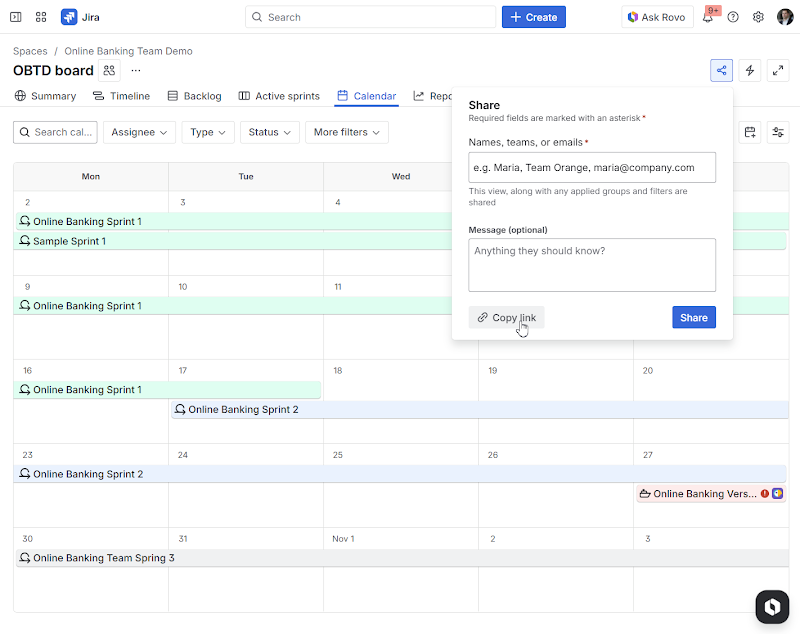
Sharing your meticulously crafted release calendar with stakeholders is simplified through Jira's intuitive sharing interface or by generating a unique, shareable link. A significant advantage of this method is that the shared link intelligently preserves:
The precise calendar configuration you've established.
All applied filters and scope, ensuring relevant data is displayed.
The exact view you've curated for your audience.
Furthermore, you can create multiple tailored views to cater to different audiences. For instance:
A high-level overview for executive leadership, focusing on strategic milestones.
A detailed view for delivery teams, encompassing all dependencies and tasks.
A customer-facing view (where appropriate), showcasing key features and availability dates.
While highly effective for individual teams or single Jira projects, modern software delivery often involves a more complex ecosystem, including:
Multiple teams collaborating across various initiatives.
Multiple Jira projects, each managing distinct components.
Independent releases of various components, requiring coordinated efforts.
For organizations requiring a truly cross-team release calendar, aggregating releases across multiple projects becomes essential. Jira addresses this need with Jira Plans, a feature available in Jira Premium, designed to support multi-project planning and comprehensive timeline visualization.
However, both Jira's out-of-the-box calendar views and Jira Plans present a common challenge: real-time updates with external clients and partners who may not have direct access to your Jira instance.
The Atlassian Marketplace offers specialized third-party applications that provide release-related gadgets. Tools like "Release Gadgets" can consolidate releases from multiple Jira projects into a unified calendar view, significantly enhancing cross-project visibility.
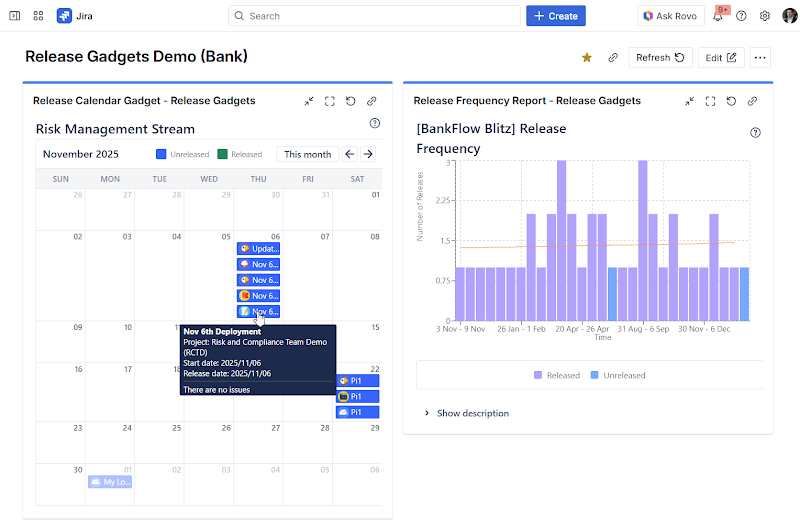
A prevalent strategy involves creating a dedicated Jira dashboard that integrates:
A release calendar gadget, providing a centralized timeline.
Progress and status gadgets, offering real-time updates on ongoing work.
Risk or blocker tracking, highlighting potential impediments.
Delivery and sprint reporting, summarizing team performance.
These dashboards are typically well-received by internal stakeholders due to their:
Highly visual presentation, making complex information easily digestible.
Ease of consumption, requiring minimal effort to understand.
Actionable insights, moving beyond mere information to facilitate decision-making.
Individual gadgets can also be embedded into Confluence pages or displayed on wallboard-style views, proving highly effective for team spaces or leadership reporting pages.
While this approach excels at managing internal stakeholder expectations and fostering transparency within the organization, it generally does not resolve the challenge of seamlessly sharing updates with external stakeholders who operate outside the Jira ecosystem.
For organizations demanding more than just visualization—such as structured workflows, granular milestones, and sophisticated cross-project coordination—the Atlassian Marketplace provides dedicated Release Management applications. These powerful tools offer comprehensive solutions for complex release environments.
An exemplary solution, such as "Release Management: Workflows, Calendar & Roadmaps," facilitates the construction of a more complete and integrated release calendar. Key capabilities include:
Cross-project releases (e.g., solution releases or meta-releases), providing a holistic view of interdependent projects.
Key pre-release and post-release milestones, ensuring all stages of the release lifecycle are tracked.
Additional key dates associated with releases, capturing all relevant events.
Engineering sprint schedules, integrating development timelines directly.
Due dates for critical Epics, Features, or Initiatives, maintaining focus on key deliverables.
Hotfixes and service releases layered alongside planned releases, offering a complete operational picture.
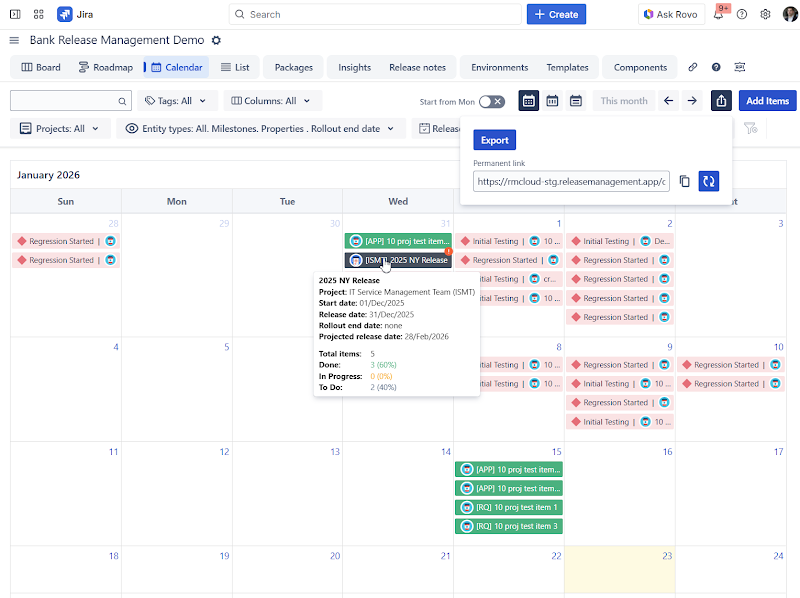
These sophisticated calendars serve as a day-to-day operational foundation for critical roles and teams, including:
Release Managers, overseeing the entire release lifecycle.
Delivery Managers, ensuring timely and efficient product delivery.
Program Managers, coordinating multiple related projects.
PMO (Project Management Office) teams, establishing and enforcing best practices.
Such calendars can also be shared with stakeholders at varying levels of detail, often through customized dashboards and gadgets, similar to the approach outlined previously.
In many enterprise environments, a significant portion of stakeholders may not have direct Jira access or may prefer to utilize their existing toolsets. This scenario commonly arises when:
Business stakeholders higher up the value chain rely on alternative business intelligence or planning tools.
You are collaborating with external partners or clients where granting direct Jira access is impractical or undesirable.
There is a strategic objective to avoid increasing Jira licenses/seats for non-technical users.
Even in these circumstances, maintaining clear expectations and ensuring stakeholder alignment on timelines remains paramount. A highly effective strategy involves integrating your release calendar into the tools these stakeholders already habitually use, most notably:
Outlook Calendar
Google Calendar
For organizations where stakeholders do not use Jira but leverage Confluence Premium, release calendars can be seamlessly integrated into Confluence alongside other enterprise-wide calendars, creating a unified information hub.
Fortunately, many advanced Release Management applications offer the capability to generate a unique iCalendar (ICS). This universal standard allows stakeholders to subscribe to the release calendar from virtually any standard calendar application, including Outlook, Google Calendar, and Confluence Premium Calendar.
This powerful feature empowers stakeholders to:
Subscribe to the release calendar directly within their preferred calendar tool.
Toggle visibility of the calendar on or off as needed, maintaining control over their view.
Receive automatic updates whenever release dates or milestones change, ensuring they always have the most current information.
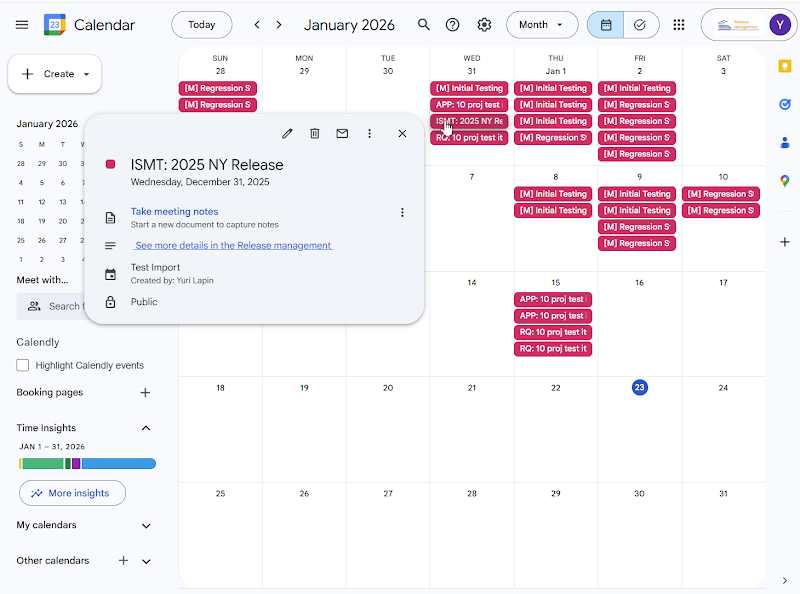
The ability to generate multiple, distinct iCalendar links facilitates highly targeted sharing, allowing you to control the scope and level of detail presented to different audiences. For example, you can create:
A client-specific release calendar, detailing only the features relevant to that client.
A partner rollout view, outlining joint deployment schedules.
A business-facing calendar, focused exclusively on production releases and their impact.
An internal calendar, encompassing all milestones, dependencies, and technical details.
This granular control is particularly valuable when managing multiple clients or partners, enabling precise communication regarding feature rollouts and update schedules.
Release calendars transcend mere date tracking; they are fundamental instruments for building and maintaining trust with all stakeholders. When stakeholders have clear, accessible visibility into release timelines and milestones, the benefits are profound:
Reduced uncertainty, fostering confidence and predictability.
Minimized repeated status requests, freeing up valuable team time.
Cultivation of a transparent delivery culture, promoting collaboration and accountability.
Whether your journey begins with Jira's built-in calendar view, progresses to enhanced visibility through dashboards and gadgets, or culminates in the adoption of a dedicated Release Management solution with external calendar sharing capabilities, the overarching objective remains constant:
To make the answer to "When?" not just easier, but proactively available—before the question even needs to be asked. Partner with Lupus Consulting to optimize your Jira release management and achieve unparalleled transparency and efficiency in your delivery processes.


Bridging the gap between SAP and Jira unlocks end-to-end visibility, improved governanc
Transform your product ideation process with Jira Product Discovery. This practical gui