How to Build a Scalable ITSM Solution with Jira Service Management

In today’s fast-paced digital landscape, IT Service Management (ITSM) is no longer just about fixing broken laptops and resetting passwords. It has evolved into a strategic enabler of business agility, employee productivity, and cross-departmental collaboration. However, many organizations find themselves constrained by legacy ITSM tools that are rigid, expensive, and disconnected from the development workflows where value is created. This is where Jira Service Management (JSM) is changing the game.

Jira Service Management, Atlassian’s purpose-built ITSM solution, offers a modern, agile, and scalable alternative that empowers over 45,000 companies to deliver exceptional service experiences. With a reported 277% return on investment and the ability to recover 115 hours per month for IT teams, JSM is not just another ticketing system—it is a platform for enterprise-wide service delivery.

This guide provides a comprehensive framework for building a scalable ITSM solution with Jira Service Management, from initial setup to enterprise-wide expansion. We will cover best practices, automation strategies, and a step-by-step roadmap to transform your service delivery from a cost center into a strategic asset.

The Foundation: Why Jira Service Management Excels at Scale

Before diving into the implementation roadmap, it is crucial to understand why JSM is inherently designed for scalability. Unlike traditional ITSM tools that were built for a pre-agile world, JSM is built on the same platform as Jira Software, the world’s leading tool for agile development teams. This native integration provides a unique advantage.

  • Unified Platform for Dev and Ops: JSM breaks down the silos between development and IT operations teams. When an incident is reported, IT can seamlessly link it to a bug in a developer’s backlog in Jira Software. This provides complete visibility from customer report to code fix, accelerating resolution times and improving collaboration.
  • Agility and Flexibility: JSM is built for agile ways of working. Its no-code/low-code workflow engine allows teams to design processes that fit their needs, rather than forcing them into rigid, ITIL-prescribed boxes. This flexibility is key to scaling service management beyond IT.
  • Automation at its Core: JSM’s powerful automation engine allows teams to automate repetitive tasks like ticket routing, status updates, and approvals. With a library of over 400 templates, teams can get started quickly and free up agents to focus on high-value work.
  • Enterprise Service Management (ESM): JSM is not just for IT. Its flexible platform can be easily extended to other business departments like HR, Facilities, Legal, and Finance, creating a unified service experience for the entire organization. This is the essence of scalable service management.

The Roadmap: A 6-Step Framework for Scalable ITSM Implementation

Building a scalable ITSM solution is a journey, not a one-time project. This six-step framework provides a structured approach to implementing and scaling Jira Service Management across your organization.
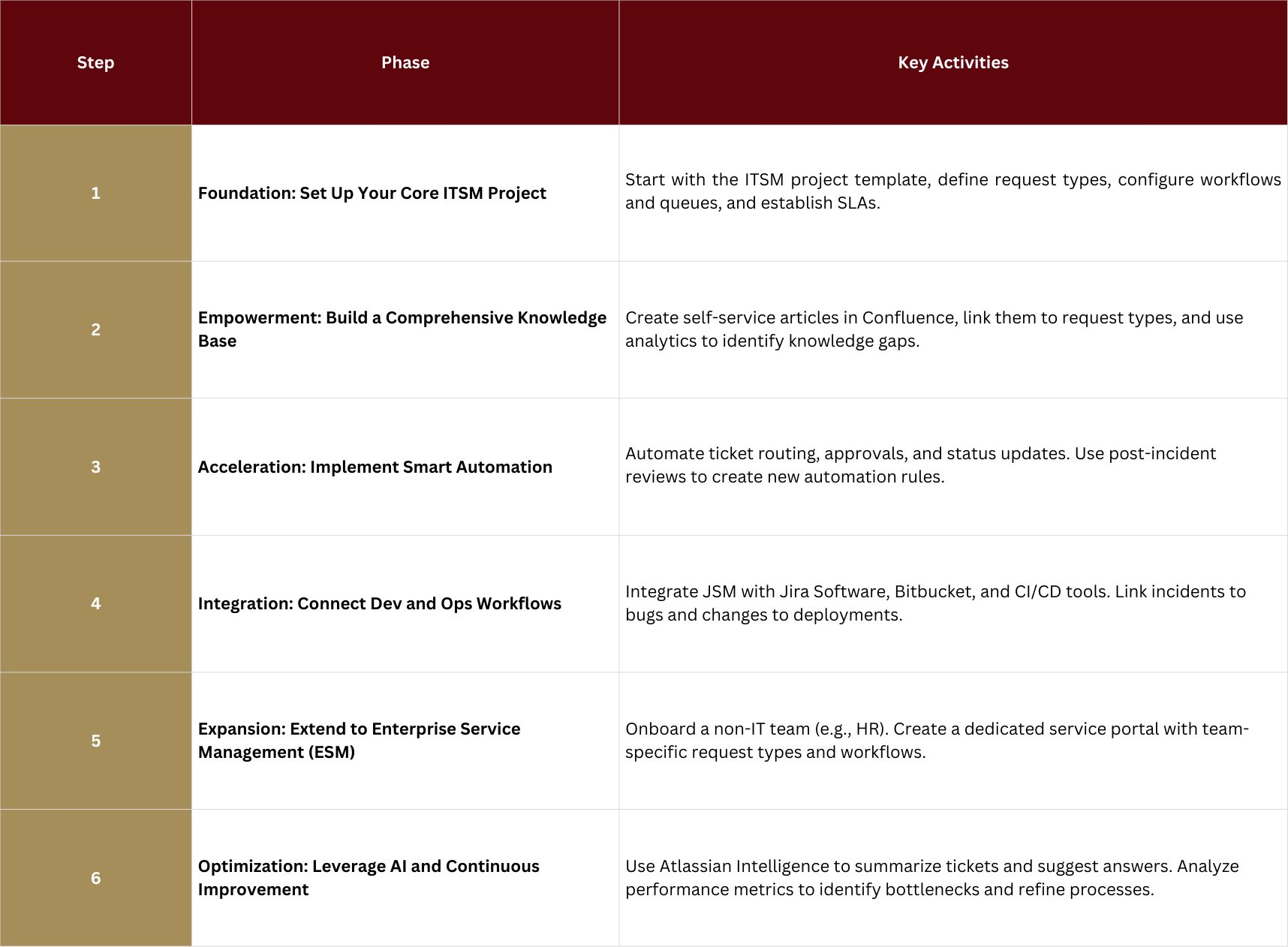
How to Build a Scalable ITSM Solution with Jira Service Management in 6 steps

Step 1: Foundation: Set Up Your Core ITSM Project

The first step is to establish a solid foundation for your IT support operations. Jira Service Management makes this easy with its pre-configured ITSM project template, which is PinkVERIFY™ certified for core ITIL processes.

  1. Create an ITSM Project: Start by selecting the “IT Service Management” template in JSM. This will automatically set up workflows and request types for common ITSM practices like incident management, change management, and service requests.
  2. Define Request Types: Customize the customer portal with clear, user-friendly request types (e.g., “Request a new software license,” “Report a Wi-Fi issue”). This makes it easy for employees to ask for help.
  3. Configure Queues and SLAs: Set up queues to help your agents prioritize work (e.g., “High-Priority Incidents,” “New Hardware Requests”). Define Service Level Agreements (SLAs) to set expectations for response and resolution times.

Step 2: Empowerment: Build a Comprehensive Knowledge Base

A scalable ITSM solution deflects common requests by empowering users to find answers themselves. JSM’s seamless integration with Confluence is a key enabler of self-service.

  1. Create a Knowledge Base: Link your JSM project to a Confluence space. This will become your central repository for how-to articles, FAQs, and troubleshooting guides.
  2. Write Articles for Common Issues: Analyze your incoming tickets to identify the most common requests. Write clear, concise articles that address these issues and publish them in your knowledge base.
  3. Enable Smart Suggestions: JSM automatically suggests relevant articles to users as they type their requests in the portal, deflecting tickets before they are even created. It also suggests articles to agents, helping them resolve issues faster.

Step 3: Acceleration: Implement Smart Automation

Automation is the engine of scalability. By automating repetitive tasks, you free up your team to handle more complex issues and strategic work. JSM’s automation engine is both powerful and easy to use.

  1. Automate Ticket Routing: Create rules to automatically assign tickets to the right team or agent based on the request type or keywords. For example, any request containing the word “Salesforce” can be automatically routed to the business applications team.
  2. Streamline Approvals: For requests that require approval (e.g., new hardware), create an automation rule that sends an approval notification to the user’s manager. The ticket can then automatically transition to the next status upon approval.
  3. Automate Status Updates: Keep stakeholders informed by creating rules that automatically send notifications when a ticket’s status changes or when a comment is added.

Step 4: Integration: Connect Dev and Ops Workflows

True scalability comes from breaking down silos. JSM’s native integration with the Atlassian development suite allows you to create a seamless flow of work from customer support to code deployment.

  1. Link Incidents to Bugs: When an agent identifies that an incident is caused by a software bug, they can link the JSM ticket directly to a new or existing bug report in Jira Software. This gives developers the context they need to fix the issue.
  2. Integrate Change Management with CI/CD: Use JSM’s change management capabilities to de-risk deployments. Automation can be used to create a change request automatically when a new deployment is initiated in a tool like Bitbucket Pipelines or Jenkins. The deployment can then be paused pending approval in JSM, providing a full audit trail.

Step 5: Expansion: Extend to Enterprise Service Management (ESM)

Once you have optimized your IT service delivery, the next step in scaling is to extend these capabilities to other business departments. This is known as Enterprise Service Management (ESM), and it is where JSM truly shines.

  1. Onboard a Pilot Team: Choose a non-IT department that has a high volume of requests, such as Human Resources (HR). Work with them to understand their common request types (e.g., “Onboard a new employee,” “Request time off”).
  2. Create a Dedicated Service Portal: Create a new JSM project for the HR team with its own portal, request types, workflows, and queues. This ensures that the HR team has a solution tailored to their specific needs.
  3. Demonstrate Value and Expand: Once the pilot is successful, use it as a case study to onboard other departments like Facilities, Legal, and Finance. The goal is to create a unified “one-stop shop” where employees can go for any internal service request.

Step 6: Optimization: Leverage AI and Continuous Improvement

Scalability is not a static state; it requires continuous optimization. Atlassian Intelligence, JSM’s built-in AI capability, provides powerful tools for ongoing improvement.

  1. AI-Powered Summaries: Use AI to instantly summarize long ticket threads, allowing agents to get up to speed quickly without reading through every comment.
  2. AI-Powered Answers: Atlassian Intelligence can analyze your knowledge base and past tickets to suggest answers to agents, helping them resolve issues faster and more consistently.
  3. Analyze Performance Metrics: Use JSM’s built-in reporting and dashboards to monitor key metrics like time to resolution, SLA success rate, and customer satisfaction. Use these insights to identify bottlenecks and areas for improvement.

Conclusion: From IT Support to Strategic Business Partner

Building a scalable ITSM solution is about more than just implementing a new tool. It is about adopting a new mindset—one that prioritizes agility, collaboration, and continuous improvement. By following this six-step framework, organizations can leverage Jira Service Management to transform their service delivery from a reactive cost center into a proactive, strategic business partner.

Start by building a solid foundation for your IT operations, then empower users with self-service, accelerate processes with automation, and break down silos between Dev and Ops. From there, you can expand your success across the enterprise, bringing the benefits of modern service management to every department. With Jira Service Management, scalability is not just a feature—it is the foundation of your entire service delivery strategy.

More Articles about Jira and other Atlassian Tools

Workflows for non technical teams

Atlassian Tools for Non-Technical Teams: Trello

From marketing to HR and operations—discover how Trello helps non-technical teams stay

Enhance Jira Efficiency: Mastering JQL for Personalized Dashboards

Using Jira Queries for Efficient Search Functions and Personalized Dashboards

Smarter Search, Better Dashboards: Unlock the full power of Jira with Smart Filters and

Mastering Jira Dashboards: Step-by-Step Guide to Effective Business Process Monitoring

Mastering Jira Dashboards: A Guide to Monitoring Business Processes Effectively