SAP
AMS
Atlassian
Products
Industries & Expertise
BEST-SHORING
SALESFORCE


In the modern enterprise, knowledge is power—but only if you can find it. Organizations invest millions in tools like Jira, Confluence, Google Workspace, Microsoft 365, Salesforce, and dozens of other SaaS applications, each generating vast amounts of valuable information. Yet employees spend an average of 1.8 hours per day—nearly one-quarter of the workweek—searching for information or recreating work that already exists. This productivity drain stems from a fundamental problem: knowledge silos. Information is fragmented across disconnected systems, and traditional search tools cannot bridge these gaps.
Atlassian, the company behind Jira and Confluence, has introduced a solution designed to solve this problem: Atlassian Rovo. Launched in 2024, Rovo is a generative AI product that goes beyond simple search to become an AI teammate for every organization. Built on Atlassian's proprietary Teamwork Graph, Rovo offers three core capabilities: unified search across all your apps, AI-powered chat that understands your business context, and customizable AI agents that automate workflows. In this article, we will explore how Rovo works, why it represents a step change in enterprise AI, and how teams can leverage it to transform productivity.
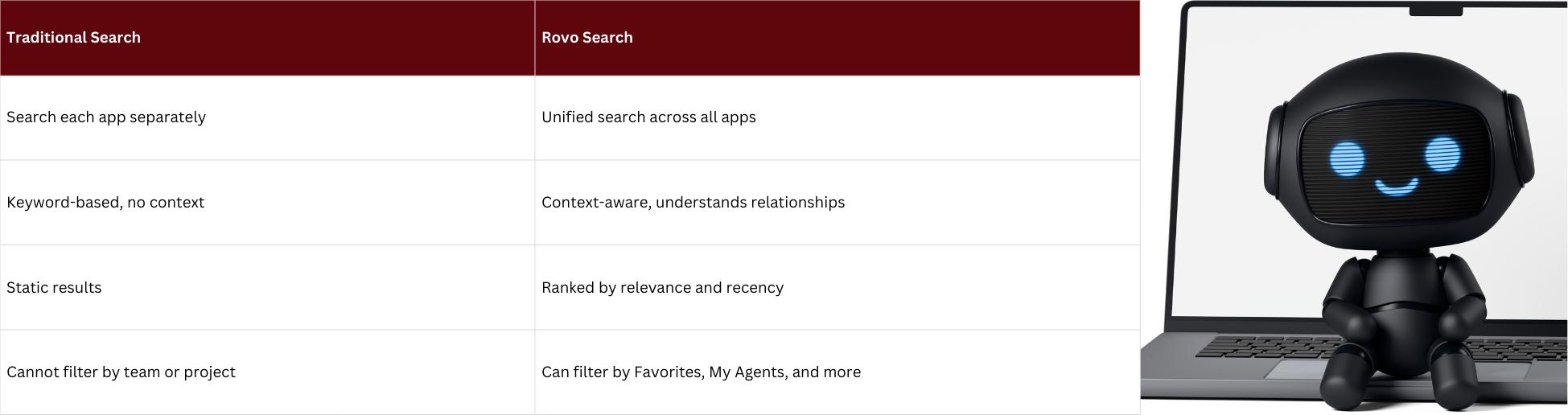
Before diving into Rovo's capabilities, it is important to understand the problem it solves. Most organizations have adopted a best-of-breed approach to software, choosing specialized tools for each function: Jira for project management, Confluence for documentation, Slack for communication, Google Drive for file storage, Salesforce for CRM, and so on. While each tool excels in its domain, they operate in isolation. When an employee needs to find information—say, the status of a feature request, the rationale behind a design decision, or a customer's support history—they must manually search multiple systems, often without knowing where to look.
Traditional enterprise search tools attempt to address this by indexing content from multiple sources, but they have significant limitations. First, they lack contextual understanding. A keyword search for "Q4 roadmap" might return hundreds of documents, but it cannot distinguish between a draft from six months ago and the final approved version from last week. Second, they cannot take action. Even if you find the right document, you still need to manually synthesize the information, update a ticket, or notify a team. Third, they do not learn from your organization's unique workflows and relationships. Generic AI models do not understand that "Project Phoenix" is your company's top priority or that Sarah is the go-to expert for API integrations.
Atlassian Rovo addresses all three limitations through its architecture, which is built on the Teamwork Graph.
The Teamwork Graph is Atlassian's proprietary data intelligence layer that connects teams, work, and apps on a single platform. It is not just an index of documents; it is a knowledge graph that understands the relationships between people, projects, tasks, files, and conversations across your entire software ecosystem. When you use Rovo, it does not just search for keywords—it understands context, recency, relevance, and relationships.
For example, if you search for "API migration status," the Teamwork Graph knows that this refers to a specific Jira epic, that it is linked to three Confluence pages documenting the architecture, that the last update was posted in a Slack channel yesterday, and that the lead engineer is David. Rovo can surface all of this information in a single, unified interface, ranked by relevance and recency. This contextual intelligence is what sets Rovo apart from generic AI search tools.
The Teamwork Graph also enables Rovo to work across third-party SaaS applications. Atlassian has built connectors for popular tools like Google Workspace, Microsoft 365, Slack, Salesforce, and more. When you connect these apps to Rovo, the Teamwork Graph extends to include their data, creating a truly unified knowledge layer. This means you can search for a customer's support tickets in Jira, their contract details in Salesforce, and their onboarding documents in Google Drive—all from a single search bar.
Atlassian Rovo is built around three core capabilities, each designed to address a different aspect of knowledge work
Rovo Search provides a single interface to search across all your Atlassian apps (Jira, Confluence, Loom) and connected third-party apps. Instead of opening multiple browser tabs and running separate searches, you can type a query into Rovo and get results from everywhere, ranked by relevance. Rovo Search understands natural language, so you can ask questions like "What are the open bugs for the mobile app?" or "Show me Sarah's recent presentations" and get accurate results.
Rovo Search is particularly powerful for cross-functional teams. In a typical software development project, product managers work in Jira, designers share mockups in Figma, engineers document code in Confluence, and customer feedback lives in Zendesk. Rovo Search brings all of this together, so when a product manager asks, "What's the status of the dark mode feature?" they can see the Jira ticket, the design files, the technical documentation, and the customer requests—all in one place.
Rovo Chat is an AI-powered conversational interface that can answer questions, summarize information, and provide insights based on your organization's knowledge. Unlike generic AI chatbots like ChatGPT, which are trained on public data, Rovo Chat is trained on your organization's data via the Teamwork Graph. This means it can answer questions specific to your business, such as "What were the key takeaways from last quarter's retrospective?" or "Who is responsible for the API integration project?"
Rovo Chat goes beyond simple Q&A. It can summarize long documents, such as a 50-page product requirements document, into a concise executive summary. It can generate content, such as drafting a project update email based on the latest Jira tickets. It can even suggest next steps, such as recommending which team members to involve in a decision based on their past contributions.
One of the most powerful aspects of Rovo Chat is its ability to cite sources. When Rovo provides an answer, it includes links to the original documents, tickets, or messages, so you can verify the information and dive deeper if needed. This transparency builds trust and ensures that AI-generated insights are grounded in real data.
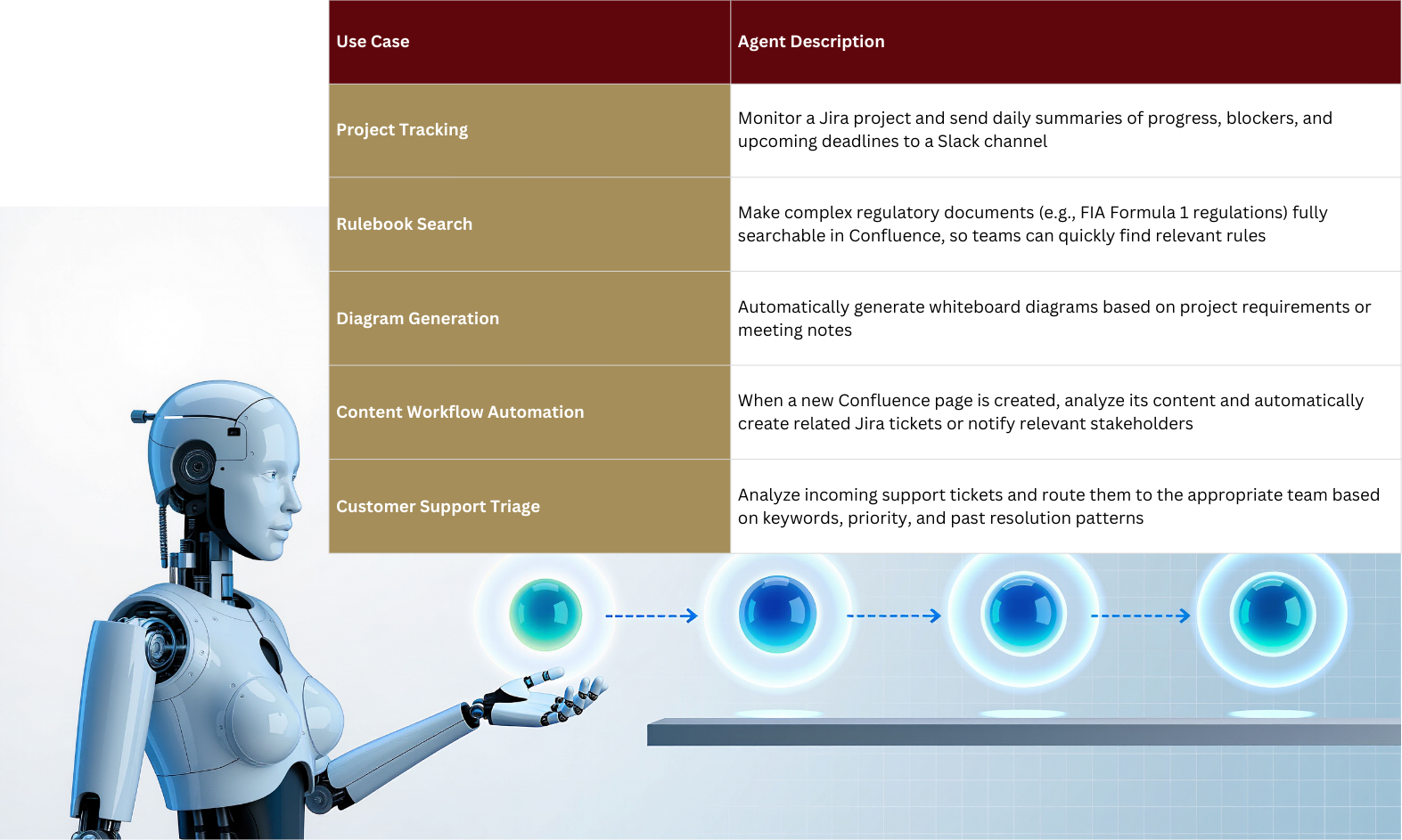
While Rovo Search and Chat help you find and understand information, Rovo Agents take action on your behalf. Rovo Agents are configurable AI teammates that can be created by any team member to automate repetitive tasks, monitor projects, and collaborate with humans. Think of them as specialized bots that handle specific workflows, freeing up your team to focus on higher-value work.
Atlassian provides a library of pre-built agents for common use cases, but the real power of Rovo Agents lies in their customizability. You can create an agent using natural language prompts or, for more advanced use cases, build one using Atlassian Forge (Atlassian's app development platform). Here are some examples of what Rovo Agents can do:
One customer, HarperCollins Publishers, reported that they tested Rovo Agents to reduce manual project work by 4x, with the goal of shifting resources to more strategic initiatives
. Another customer, Procore, noted that Rovo Search is helping their teams "find information much faster, reduce cognitive load, and stay in the flow".
One of Rovo's key strengths is that it meets you wherever you work. You do not need to switch to a new app or change your workflows. Rovo is accessible in multiple ways:
This flexibility ensures that Rovo fits naturally into your existing workflows, rather than requiring you to adopt a new tool.
A common concern with AI tools is data security and privacy. Atlassian has designed Rovo with enterprise-grade security and compliance from the ground up. Rovo is built on the trusted Atlassian Cloud Platform, which is certified for industry standards such as SOC 2, ISO 27001, and GDPR. Organizations can manage AI-powered features at scale with advanced controls, including:
Importantly, Atlassian does not use your data to train public AI models. Your organization's knowledge stays within your Atlassian environment, ensuring confidentiality and intellectual property protection.
Atlassian Rovo is available as part of the Atlassian Teamwork Collection, which includes Rovo, Jira, Confluence, and Loom. Over 3 million users are already harnessing the power of AI across Atlassian apps. Rovo is Cloud-only, so it is not available for organizations still using Data Center or Server editions. However, for Cloud customers, getting started is straightforward:
Atlassian Rovo represents a vision of the future where humans and AI work side by side. AI does not replace human judgment, creativity, or empathy—it augments them by handling repetitive tasks, surfacing relevant information, and accelerating decision-making. Rovo's ability to understand your organization's unique context, thanks to the Teamwork Graph, makes it far more than a generic AI tool. It is an AI teammate that knows your business, learns from your workflows, and helps your team achieve more.
As one Rovo user from Arthrex put it: "It's intuitive and customizable, allowing me to adapt it perfectly to our needs. Our team's productivity has noticeably improved". Another user from 24 Hour Fitness noted: "I'm all-in on Rovo. You can go from complex Jira releases, to Confluence release notes, to Rovo-generated summaries all within minutes".
The knowledge silo problem is not going away—if anything, it is getting worse as organizations adopt more SaaS tools. But with Atlassian Rovo, teams finally have a solution that can keep up. By unifying search, providing context-aware AI chat, and enabling customizable agents, Rovo transforms how teams find information, make decisions, and get work done. If your organization runs on Atlassian, Rovo is not just a nice-to-have—it is a competitive advantage.
The new AI platform for enterprise knowledge management. With Rovo Search, Chat, and St
Managing hundreds of microservices? Atlassian Compass is an internal developer platform