corporate buildings

SAP S/4HANA Migration Cockpit: Complete Guide

    A comprehensive technical guide to the SAP S/4HANA Migration Cockpit with focus on functionality, use cases, and practical limitations.

    Part 1: The Migration Cockpit: Functionality and Application

    What is the SAP S/4HANA Migration Cockpit?

    The SAP S/4HANA Migration Cockpit (also known as LTMC or "Legacy Transfer Migration Cockpit") is SAP's central standard tool for the one-time initial data transfer into an S/4HANA system. It was designed as the successor to the classic Legacy System Migration Workbench (LSMW), which is no longer fully supported under S/4HANA.

    The Cockpit provides a structured, graphical framework for migrating data from any source systems – whether SAP ECC, other SAP systems, or completely external, non-SAP systems. It is included as an integral component of SAP S/4HANA and requires no additional licenses.

    Why is the Migration Cockpit Important?

    Data migration is one of the most critical success factors in S/4HANA implementations. Faulty or incomplete migration can lead to data loss, business process interruptions, and significant costs. The Migration Cockpit standardizes this process and reduces risk through:

    • Predefined Migration Objects: SAP provides pre-configured migration objects for the most common data types (Material Master, Business Partner, Cost Centers, etc.).
    • Structured Processes: A clear, repeatable process from planning to validation.
    • Integrated Validation: Automatic consistency checks and error handling.
    • Audit Trail: Documentation of all migration operations for compliance requirements.

    Process Flow: How Does Migration Work?

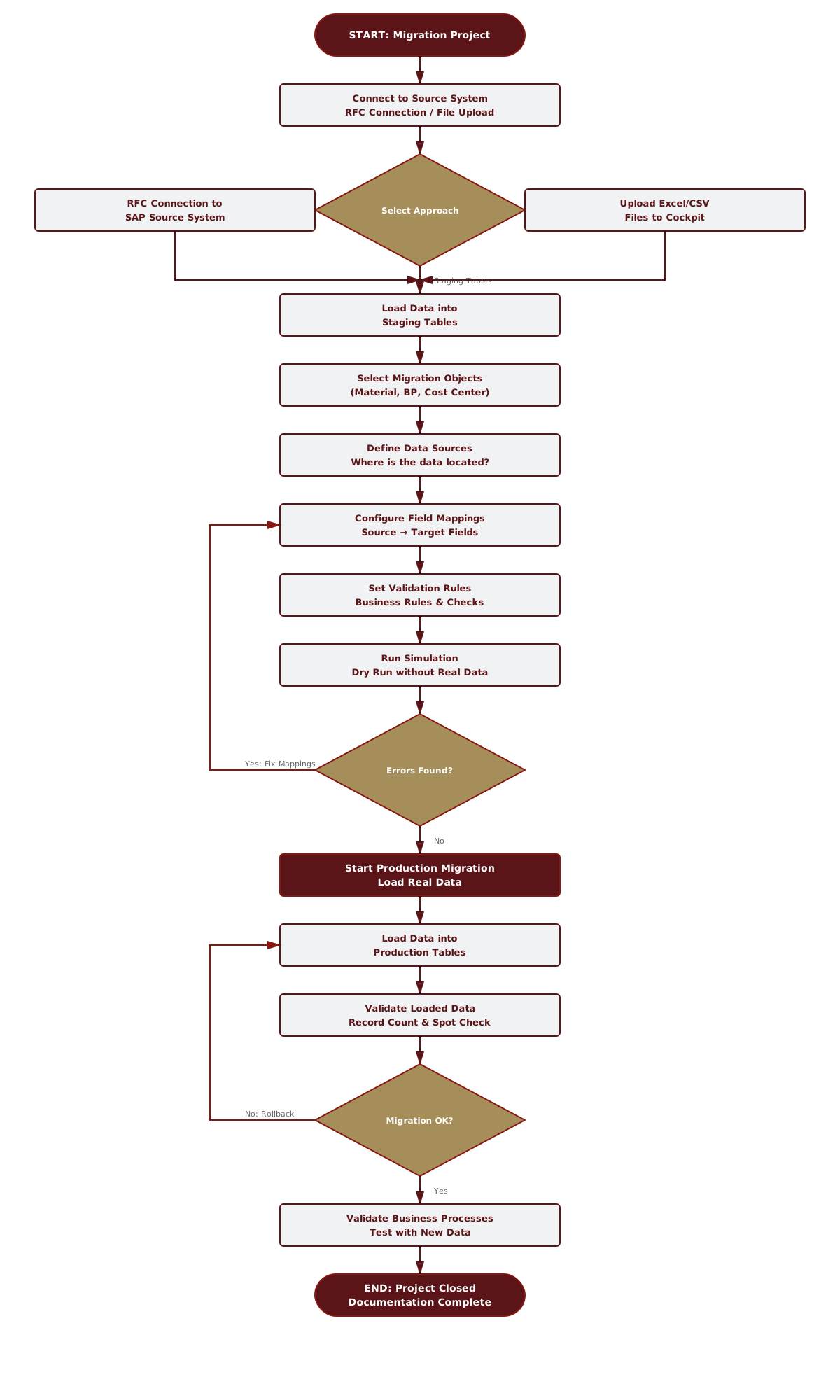
    The following diagram shows the typical flow of a data migration with the Migration Cockpit:
    sap migration cockpit process flow diagram

    Phase 1: Preparation and Approach Selection

    The first step is connecting to the source system and selecting the migration approach. The Cockpit offers three different methods for provisioning data:

    Direct Transfer:

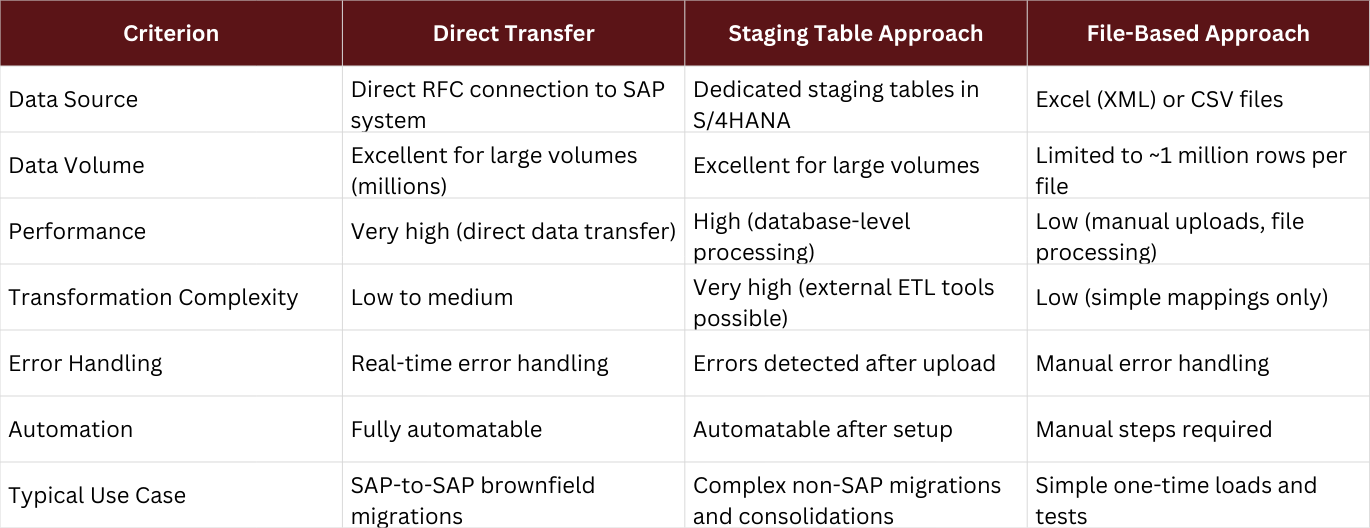
    Direct RFC connection to the SAP source system. Data is extracted live from the source system and loaded into S/4HANA. This is the fastest method for SAP-to-SAP migrations.

    Staging Table Approach

    Data is first loaded into dedicated staging tables in the S/4HANA database. From there, it can be transformed and validated with ETL tools before being transferred to productive tables. This offers maximum flexibility for complex transformations.

    File-Based Approach

    Data is provided as Excel-XML or CSV files and manually uploaded to the Cockpit. This is the simplest method for small, one-time loads.

    Phase 2: Configuration and Mapping

    After selecting the approach, migration objects are selected and configured:

    1. Select Migration Objects: Which data should be migrated? (e.g., Material Master, Business Partner, Cost Centers)
    2. Define Data Sources: Where is the data located in the source system?
    3. Field Mappings: How are source system fields mapped to target system fields?
    4. Validation Rules: What business rules and consistency checks must be met?

    This mapping is the most critical step, as incorrect mappings lead to faulty data in the target system.

    Phase 3: Simulation and Error Handling

    Before real data is loaded, the Cockpit runs a simulation. This is a dry run in which the entire process is executed without actually writing data to the productive tables. The simulation shows which data would be loaded, which errors or warnings would occur, and how long the process would take. If errors occur, the mappings can be corrected and the simulation can be run again.

    Phase 4: Productive Migration

    After the simulation has been completed successfully, the productive migration is started. The Cockpit extracts the data from the source systems or staging tables, transforms it according to the defined mappings, validates it against the business rules, and loads it into the productive tables. If errors occur during the migration, they can either be corrected or a rollback can be performed to restore the previous state.

    Phase 5: Validation and Completion

    After the successful migration, the loaded data is validated. This includes data reconciliation, sample checks, and business process testing. Once validation is successfully completed, the migration project is finalized and documented.

    Migration Approaches in Detail

    Recommendation: Direct Transfer is ideal for purely technical SAP system upgrades. The Staging Table Approach offers the necessary flexibility for heterogeneous landscapes and high data quality requirements

    faqicon

    Is the Migration Cockpit included in the S/4HANA license?

    Yes, the Migration Cockpit is an integral part of SAP S/4HANA and requires no additional licenses or costs.

    faqicon

    Can the Cockpit be used for migration to SAP S/4HANA Cloud?

    Yes, for migration to SAP S/4HANA Cloud (Public Edition), the Migration Cockpit with the staging approach is the primary and SAP-recommended tool. Direct Transfer is not available in the Cloud.

    faqicon

    Can the Cockpit be used for migrations from non-SAP systems?

    Yes, the Cockpit is not limited to SAP source systems. It can migrate data from any other system as long as the data is brought into the correct format (staging tables or files).

    faqicon

    What is the difference between the LTMC transaction and the "Migrate Your Data" Fiori app?

    The LTMC transaction was the original entry point to the Migration Cockpit. In newer S/4HANA releases (from 2020 onwards), this was replaced by the modern "Migrate Your Data" Fiori app. The Fiori app offers a more modern user interface and extended features, but the underlying technology is the same.

    Part 2: Limitations and Core Problems

    The Central Problem: Which Data CANNOT Be Migrated with the Standard Cockpit?

    One of the most common challenges in S/4HANA migration projects is the assumption that the Migration Cockpit is a universal solution for all data objects. In practice, however, there are clear limits that must be considered during project planning to avoid delays and unforeseen expenses.

    Important: The limitations are not shortcomings of the tool, but rather reflect its design as a specialized tool for standard migrations.

    Technical Limitations

    Data Volume and Performance Limitations

    The Cockpit consumes a maximum of 80 percent of the system’s available batch jobs. In high-volume migrations (several hundred million records), performance bottlenecks can occur, especially if the system is simultaneously under load from other batch processes.

    Missing or Incomplete Migration Objects

    The Cockpit is delivered with a predefined library of migration objects. This covers the most common scenarios but leaves gaps for specialized use cases such as Z objects, industry solutions, and extensions of standard objects.

    Limitations in Data Cleansing

    The Cockpit provides only basic validation mechanisms. It does not offer comprehensive capabilities for automated data cleansing, complex transformation logic, or fuzzy matching.

    Dependencies and Sequencing

    The Cockpit manages dependencies between migration objects but cannot automatically resolve complex, cross-system dependencies.

    Solutions for Non-Migratable Objects

    Various technical solution approaches exist to address these challenges:

    Creation of Custom Migration Objects (LTMOM)

    The Migration Object Modeler is a tool within the S/4HANA system used to create custom migration objects.

    Use of ETL Tools

    For scenarios that require extensive data transformation, combining the migration with ETL tools such as SAP Data Services is the preferred approach.

    Development of ABAP-Based Loading Logic

    Dedicated ABAP programs using BAPIs or function modules enable highly precise data posting.

    Manual Migration

    For highly critical but manageable data volumes, a controlled manual migration is often the safest approach.

    Skyscrapers

    Are you planning a data migration using the Migration Cockpit?