SAP
AMS
Atlassian
Products
Industries & Expertise
BEST-SHORING
Knowledge Base
SALESFORCE


Atlassian Forge is a next-generation cloud development platform that allows developers to build, host, and run apps directly on Atlassian's infrastructure. By providing a serverless environment, built-in security, and a simplified UI kit, Forge enables developers to create powerful extensions for Jira and Confluence without the need to manage external servers or complex authentication protocols.
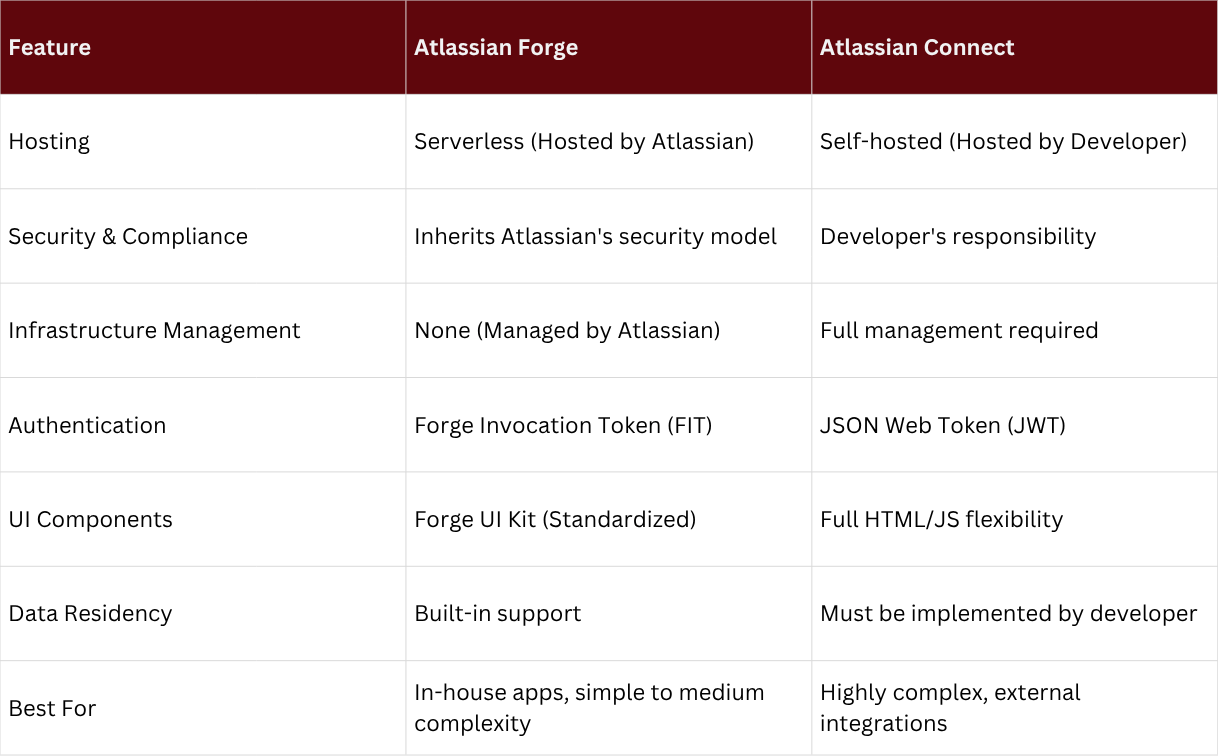
Traditionally, building apps for Atlassian Cloud required the Atlassian Connect framework, where developers had to host their own infrastructure and manage data security independently. Forge changes this by offering a serverless architecture. This means Atlassian handles the hosting, scaling, and security, allowing you to focus entirely on writing code and delivering value to users.
For developers deciding between the two frameworks, understanding their core differences is essential:
If you're new to Forge, here is a quick roadmap to building your first app:
First, you'll need to install the Forge CLI on your local machine. This requires Node.js and a free Atlassian developer account.
npm install -g @forge/cli
Use the CLI to create a new app from a template. You can choose templates for Jira, Confluence, or specific modules like custom fields or macros.
forge create
The manifest.yml file is the heart of your Forge app. It defines the app's permissions (scopes), modules, and the functions that will be triggered by specific events.
Forge uses a serverless function model. You write your logic in JavaScript or TypeScript, and then deploy it to the Atlassian Cloud with a single command:
forge deploy
Once deployed, you can install the app into your development site and start testing its functionality in real-time.
forge install
Atlassian Forge represents the future of app development in the Atlassian ecosystem. For beginners, it removes the technical barriers of infrastructure and security, making it easier than ever to build custom solutions. Whether you're creating a simple internal tool or a commercial app for the Marketplace, Forge provides the speed, security, and scalability you need to succeed.

Atlassian’s EU Financial Services Addendum helps banks and insurers meet BaFin and EBA

The new AI platform for enterprise knowledge management. With Rovo Search, Chat, and St